Paperclip AI Day 5: Hands-On — Your AI Company Ships Its First Project
Run the full pipeline from scratch: set a goal, let the CEO decompose it, approve the strategy, watch heartbeat scheduling in action, agents execute, and deliver a real personal landing page. Every pitfall documented.

📎 Four days of theory. Time to put your company to work.
Over the past four days, you’ve learned how to build a company, hire employees, set goals, and control budgets. But have you noticed something — your AI company hasn’t actually delivered a single product yet.
Today, we’re giving the company a real mission: build a personal landing page. Then sit back with a cup of coffee and watch your cyber workhorses run the entire pipeline from planning to delivery.
Why “Build a Landing Page”?
This wasn’t a random choice. The project happens to satisfy several criteria:
- Full pipeline coverage: Planning → Design → Development → Delivery — all four stages
- Instantly visible results: Open the
.htmlfile in your browser, see the outcome in 3 seconds - Multi-role collaboration: CEO handles planning, CTO (or Engineer) designs the technical approach, Engineer writes the code
- Real and plentiful pitfalls: And every one of them ties back to what you learned in the first four days
Let’s begin.
Pre-Flight Check
Make sure the following are ready:
- Your Paperclip server is running (
npx paperclipai onboard --yes) - Your org chart has at least a CEO and an Engineer (set up in Day 2)
- The CEO’s heartbeat is enabled (we’ll verify this below)
- Budget isn’t too tight — $10 for the company and $5 per Agent is enough for this exercise
💡 If you’re starting completely fresh, no worries — Day 2 has the full company setup walkthrough.
Step 1: Assign a Mission to Your Company
Go to your company’s Goals page and create a new Company Goal:
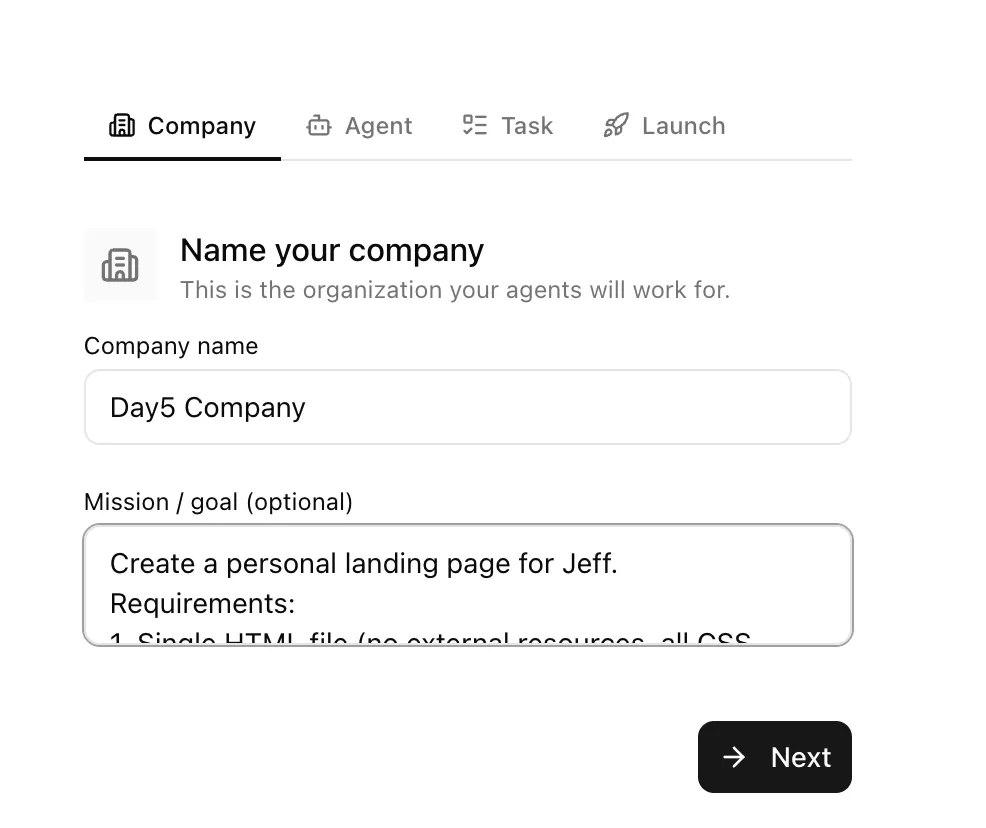
Here’s what I wrote:
Create a personal landing page for Jeff (BTW :) My name is Jeff).
Requirements:
1. Single HTML file (no external resources, all CSS inline)
2. Include the following sections: top Hero (name + one-sentence introduction), About Me, Project Showcase (3 cards), Contact Information
3. Modern and minimalist design with dark theme
4. Mobile-responsive
5. Output to: ~/day5landing_page/index.html
🪤 Pitfall #1: Vague Goals = Garbage Output
What happens if you just write “make me a landing page”?
The CEO will produce a plan, and the Engineer will deliver a page — but when you open it, it’ll be a screen full of Lorem Ipsum on a Bootstrap template, indistinguishable from any random search result.
Why? Recall the core concept from Day 3: goals are DNA. If your goal doesn’t specify “single HTML file,” the Engineer might split it into HTML + CSS + JS as three separate files. If you don’t say “dark theme,” you’ll get a default white-background page. If you don’t mention “mobile-responsive,” there won’t be any responsive design.
📎 Boss Rule: Spend 5 extra minutes making the goal specific. Those 5 minutes will save you 50 minutes of back-and-forth.
Step 2: CEO Decomposes the Strategy
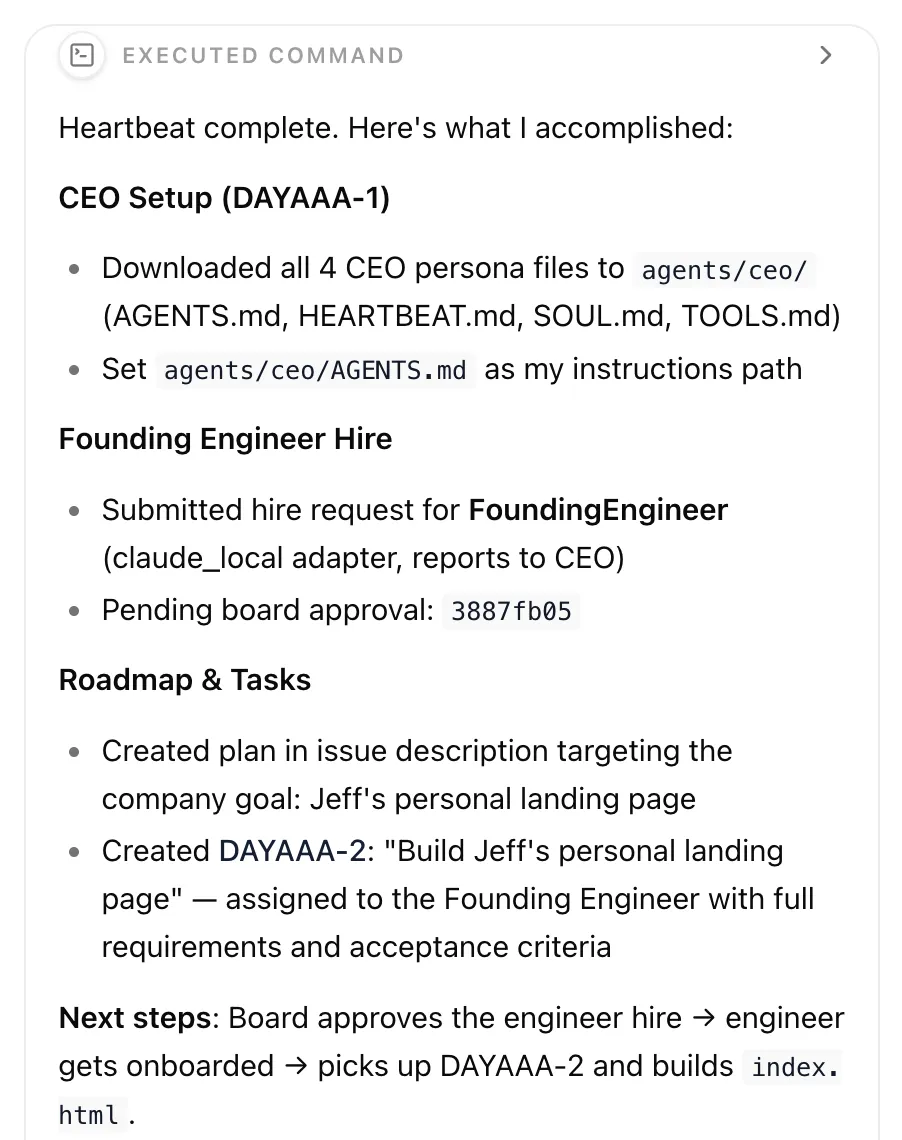
Once the goal is set, wait for the CEO’s next heartbeat (or trigger it manually). The CEO will:
- Read the company goal
- Create a Project (e.g., “Personal Landing Page Development”)
- Break the project into several Issues
Here’s what a typical CEO decomposition looks like:
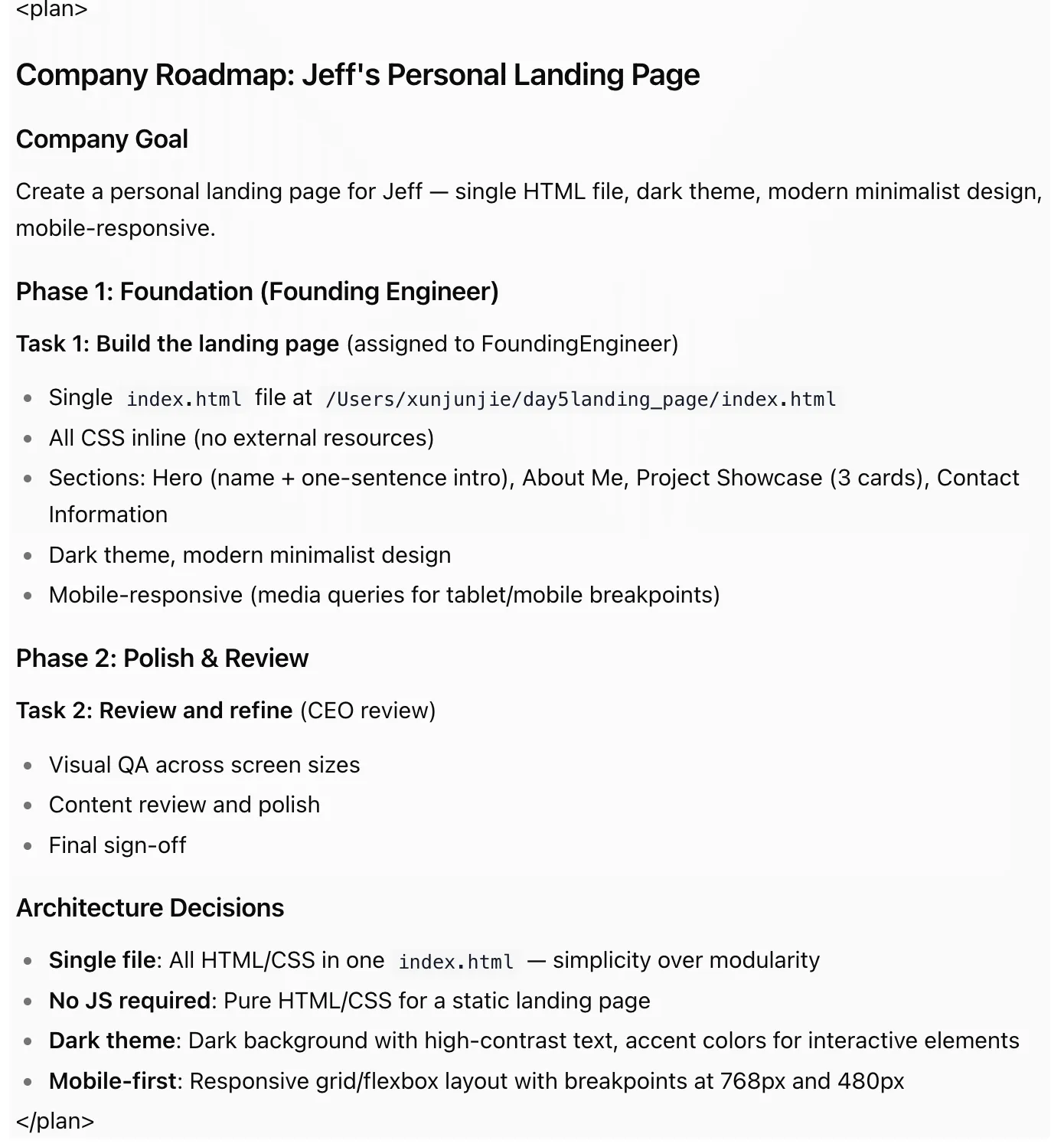
What Shows Up in Your Inbox
The CEO will submit an Approval Request. This is what the strategic approval gate from Day 3 looks like in practice.
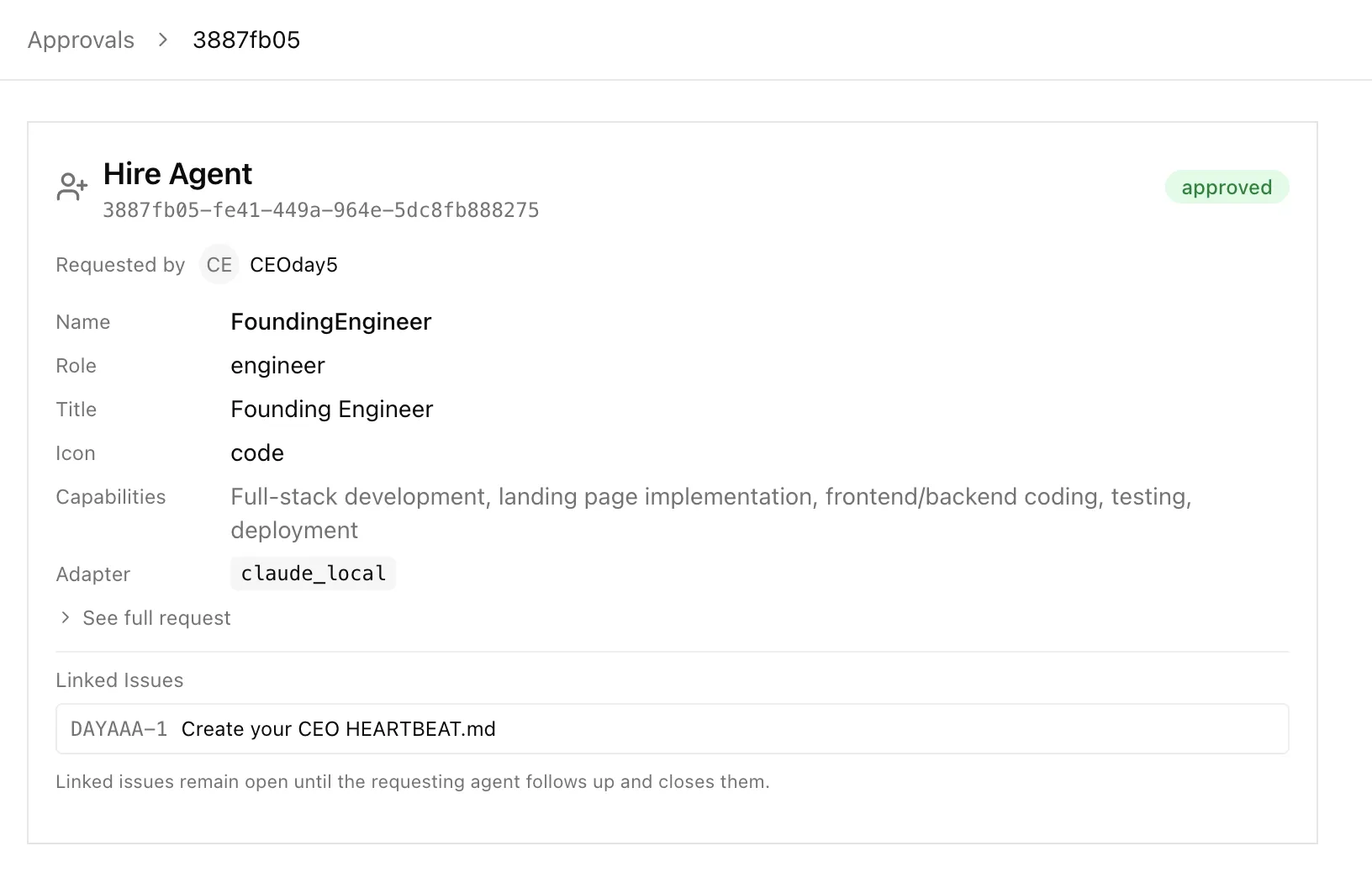
Review it carefully:
- Does the decomposition make sense?
- Is the output path correct?
- Are the right people assigned?
If everything checks out, click Approve. The machine starts turning.
🪤 Pitfall #2: CEO Creates Too Many Issues
Sometimes the CEO gets overly enthusiastic. What should be 3–4 Issues balloons into 8–10, filled with things like “Research the color psychology of dark themes” and “Analyze competitor landing page designs.”
What to do? Reject it, then add a note to your goal: “Keep it simple — 3-4 Issues maximum. This is a single-page HTML file, not a product launch.”
That’s your power as Chairman!
Step 3: Watch the Heartbeat Engine Work
After approval, this is where things get interesting.
Don’t Want to Wait? Wake Them Up Manually
If you don’t want to wait for the 2-minute heartbeat cycle:
- Via UI: Go to the Agent detail page and click the Run Heartbeat button
- Via API:
curl -X POST http://localhost:3100/api/agents/{agentId}/heartbeat/invoke
The Breathing Rhythm
Paperclip’s execution follows a diastole-systole rhythm, just like a heartbeat:
Diastole (Expansion): The CEO wakes up, discovers approved Issues, and assigns them to subordinates.
Systole (Contraction): The Engineer wakes up, picks up the Issue, executes the work, updates the status, and the result flows back up the reporting line.
Timeline (assuming 60-second heartbeat interval):

T+0 min    CEO heartbeat fires → assigns Issue #1 to Engineer
T+1 min    Engineer heartbeat fires → picks up Issue #1, starts working
T+3 min    Engineer completes Issue #1, status → done
T+4 min    CEO heartbeat fires → sees #1 done, assigns Issue #2
T+5 min    Engineer heartbeat fires → picks up Issue #2
...
🪤 Pitfall #3: “Why Is Nothing Happening After Approval?”
You clicked Approve. You’ve been staring at the Dashboard for 10 minutes. Nothing moves.
What’s going on? The default heartbeat interval is 3600 seconds — meaning the CEO only wakes up once per hour. For this tutorial, let’s speed things up.
Option A: Change Heartbeat in the UI (Recommended)
Do this for both the CEO and Engineer:
- Click Agents in the left sidebar
- Click on the target Agent to open the detail page
- Find the Agent Settings / Runtime Config section
- Update the heartbeat settings:
intervalSec: change to120(once every 2 minutes)cooldownSec: change to30wakeOnDemand: make sure it’struemaxConcurrentRuns: keep at1
- Save
Option B: Via API (if you can’t find the setting in the UI)
# Replace {agentId} with the actual value (visible in the Agent detail page URL)
curl -X PATCH http://localhost:3100/api/agents/{agentId} \
  -H "Content-Type: application/json" \
  -d '{
    "runtimeConfig": {
      "heartbeat": {
        "enabled": true,
        "intervalSec": 120,
        "cooldownSec": 30,
        "wakeOnDemand": true,
        "maxConcurrentRuns": 1
      }
    }
  }'
Run this once for the CEO and once for the Engineer.
💡 Heartbeat Parameter Cheat Sheet:
Parameter What It Does Recommended for This Tutorial intervalSecHow often the agent wakes up 120(2 minutes)cooldownSecMinimum gap between runs 30wakeOnDemandCan be manually triggered truemaxConcurrentRunsHow many parallel executions allowed 1(keep it simple)In production you’d set these much higher (CEO: 1 hour, Engineer: 30 minutes). But during learning, crank up the frequency so you’re not staring at a blank screen.
🪤 Pitfall #4: Engineer Gets Stuck Mid-Task
The Engineer starts working on Issue #3 (writing the HTML code). The progress bar is moving… then suddenly, the Issue status stays at in_progress with no new output.
Check the Agent’s adapter config:
{
  "maxTurnsPerRun": 300,
  "timeoutSec": 0
}
For a single-file landing page, 300 turns is usually enough. But if your goal description is very detailed (specifying animations, exact copy, precise color values), the Agent might need more turns.
Quick fix:
curl -X PATCH http://localhost:3100/api/agents/{engineerAgentId} \
  -H "Content-Type: application/json" \
  -d '{
    "adapterConfig": {
      "maxTurnsPerRun": 500,
      "timeoutSec": 600,
      "graceSec": 15
    }
  }'
📎 This is Day 4’s runtime safeguards in action. The system intercepted a potentially runaway execution for you. Once you’ve confirmed the task is legitimate, manually raise the limit and the Agent gets back to work.
Step 4: Inspect the Deliverable
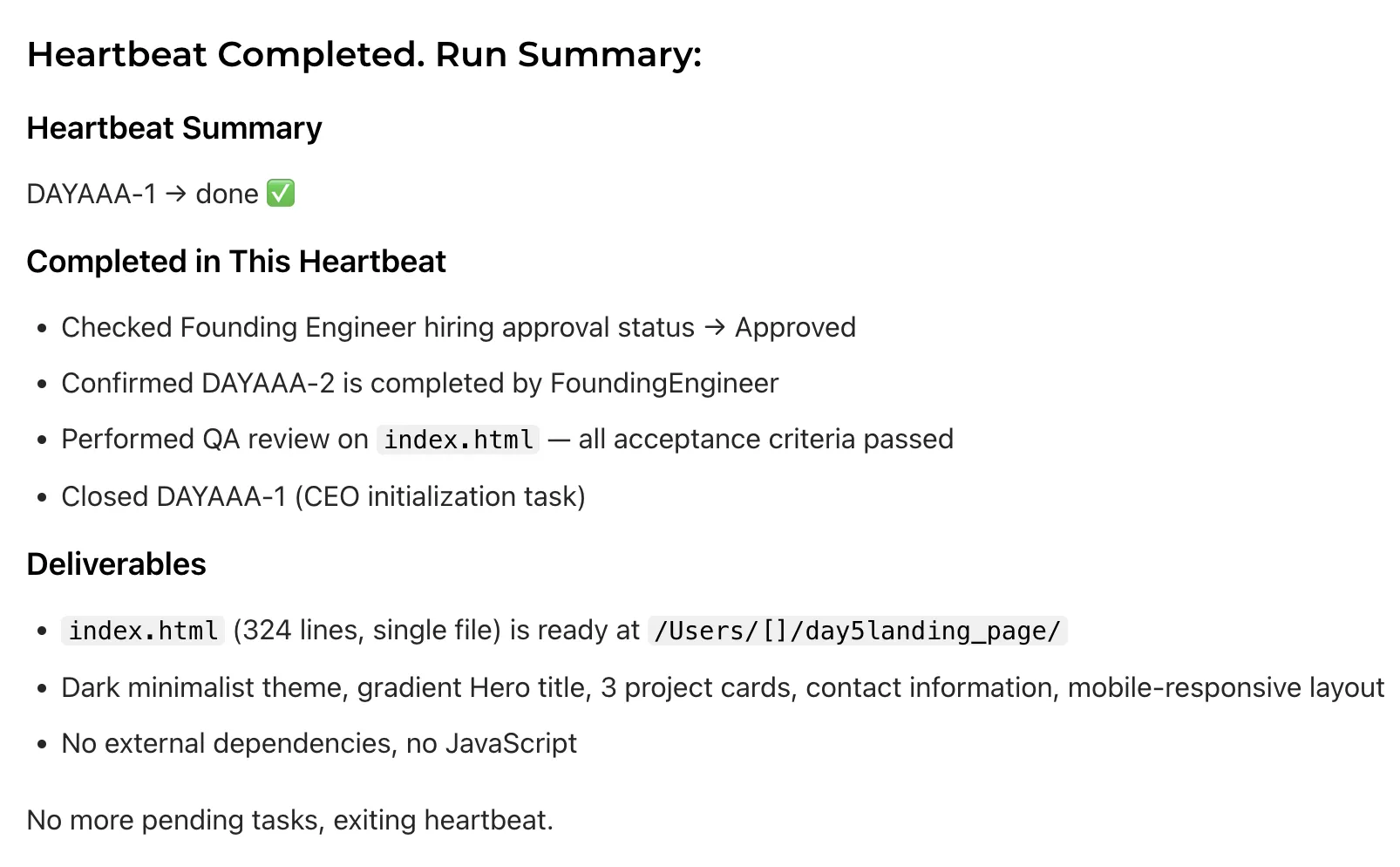
If everything goes smoothly (and after stepping through the pitfalls above, it will), you’ll eventually see:
- All Issues moved to
donestatus - The
index.htmlfile has been generated - The CEO sent a final summary to your inbox

Open the file:
# Using my own directory as an example here
open ~/day5landing_page/index.html
# Linux users:
# xdg-open ~/day5landing_page/index.html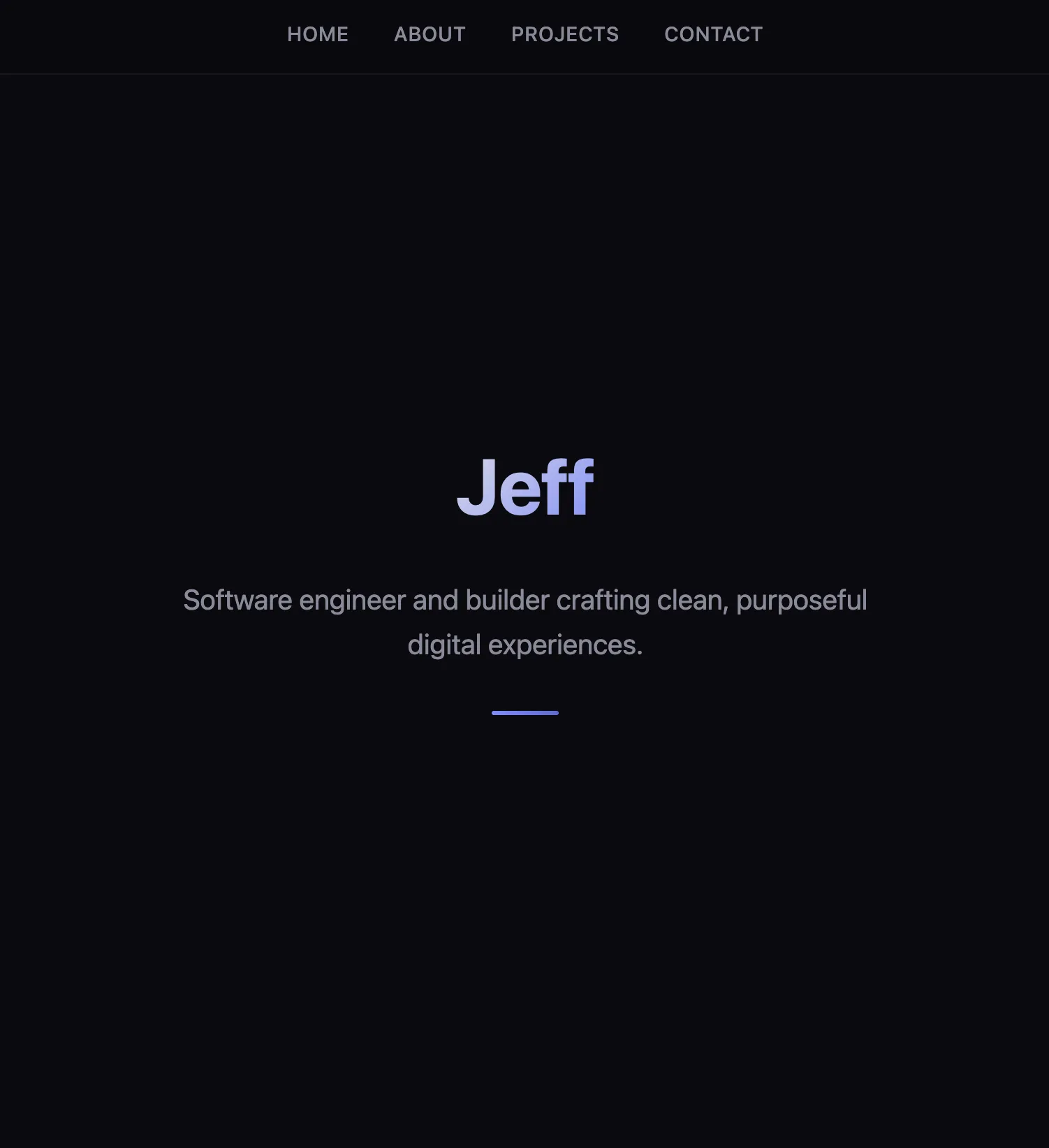
What You’ll Probably See
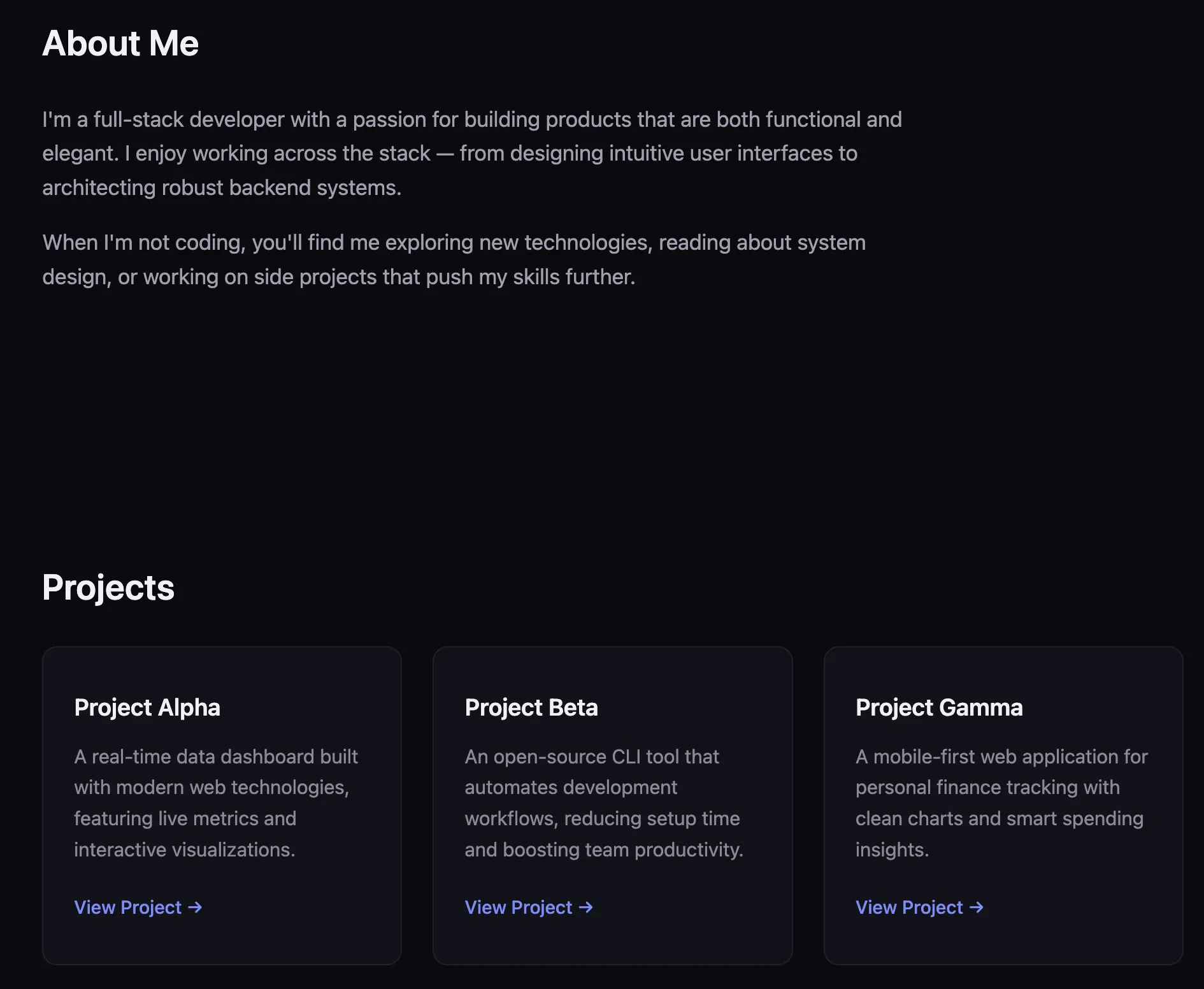
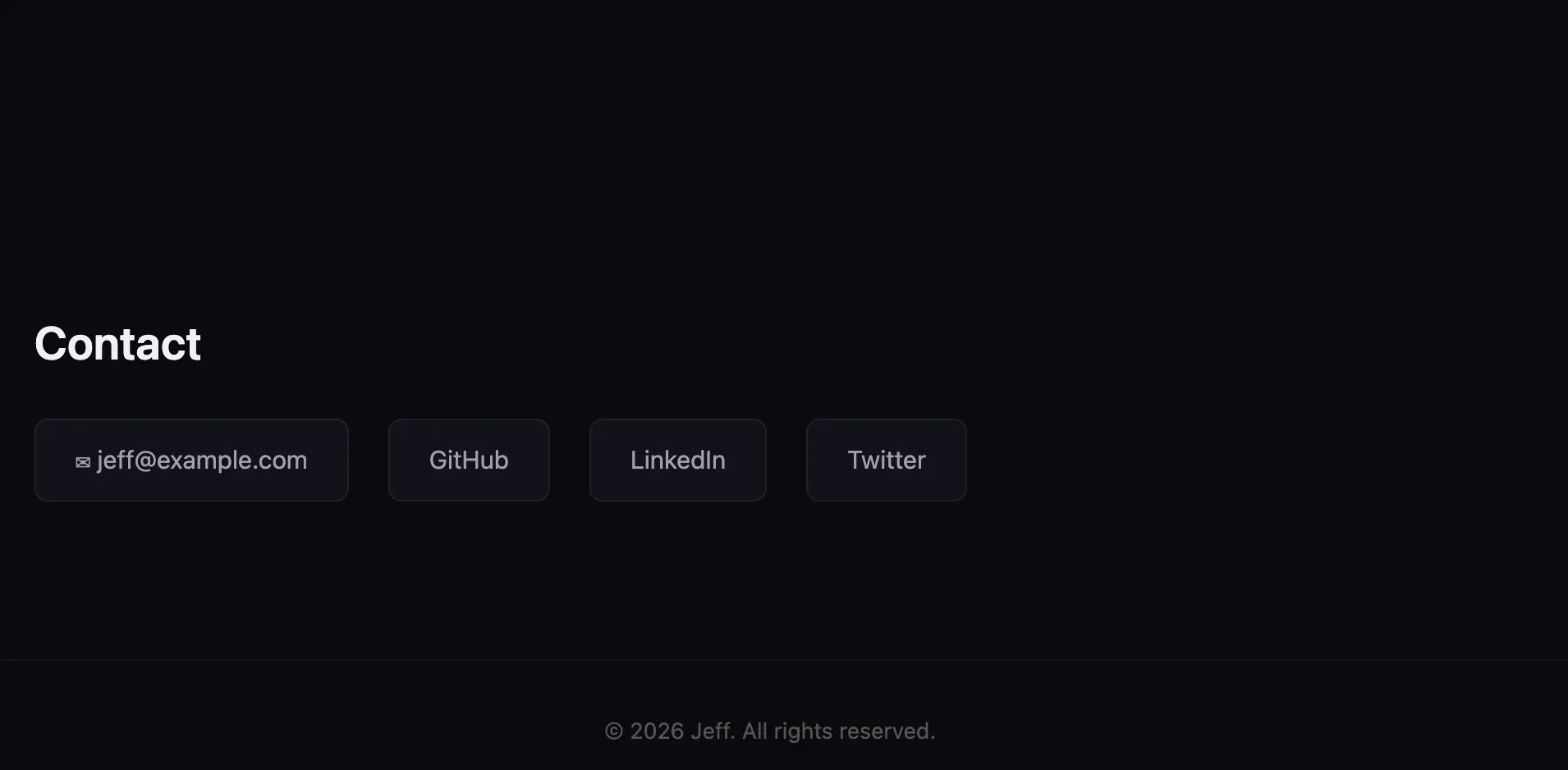
A fully functional landing page:
- Your name and a one-line intro at the top
- An “About Me” section
- Three project cards
- Contact information at the bottom
- Dark theme (if you specified it)
- Mobile-responsive (if you specified it)
Perfect? Probably not. The colors might be off, the copy might feel AI-generated, and the spacing might be a bit broken on mobile.
But that’s not the point. The point is: you didn’t write a single line of code. You set a goal, approved a plan, and your company delivered a working product.
Step 5: Iterate Like a Boss
The page is delivered but needs polish. Do not open your code editor.
Create a new Issue (or comment on an existing one — but remember to assign it to the CEO. You’re the Chairman; you only need to delegate to the CEO, or wait for the next heartbeat and let the CEO handle the assignment):
You are leading the redesign of this landing page.

The current version is structurally functional, but visually underwhelming — it looks too minimal to the point of feeling unfinished. I want the page to deliver a more polished, modern, and design-forward experience when a user opens it.

Treat this as a **design upgrade project**, not just a styling tweak. Your job is to organize the necessary design and engineering work to achieve the following goals.

**First, the Hero section must become the visual focal point of the page.**
It currently feels flat and forgettable. When a visitor opens the page, the first screen should immediately convey a sense of clarity, professionalism, and high quality. The Hero needs more visual hierarchy, presence, and impact.

**Second, the overall color system needs to be more harmonious and intentional.**
The current colors are functional but lack coherence and design sensibility. Establish a cleaner, more modern, and balanced color palette while keeping the dark theme. Accent colors should feel deliberate, not incidental.

**Third, add a background visual element to the Hero section.**
The background should relate to the developer / blog / personal site theme. Keep it subtle — use opacity or overlays to ensure text remains fully readable. The goal is to add depth and atmosphere, not visual noise.

**Fourth, rethink the typography system.**
The current fonts are usable but generic. I want a clearer typographic hierarchy and a font combination better suited for a modern technical personal site.

**Fifth, make the page feel more polished overall.**
Refine spacing, rhythm, and component styling so the page looks more designed and cohesive rather than empty. Cards, links, and interactive elements should feel modern with good hover feedback.

**Key constraints:**

* Keep the page lightweight.
* Do not introduce any frameworks.
* Keep the single HTML file structure.
* Improvements should come from better design decisions, not added complexity.

The end result should look like a modern developer portfolio or tech blog landing page — the overall quality should be comparable to a well-designed product homepage.

Return the complete HTML file after the design upgrade.
This triggers another cycle: CEO assigns → Engineer picks up → delivers the updated file.
Updated page
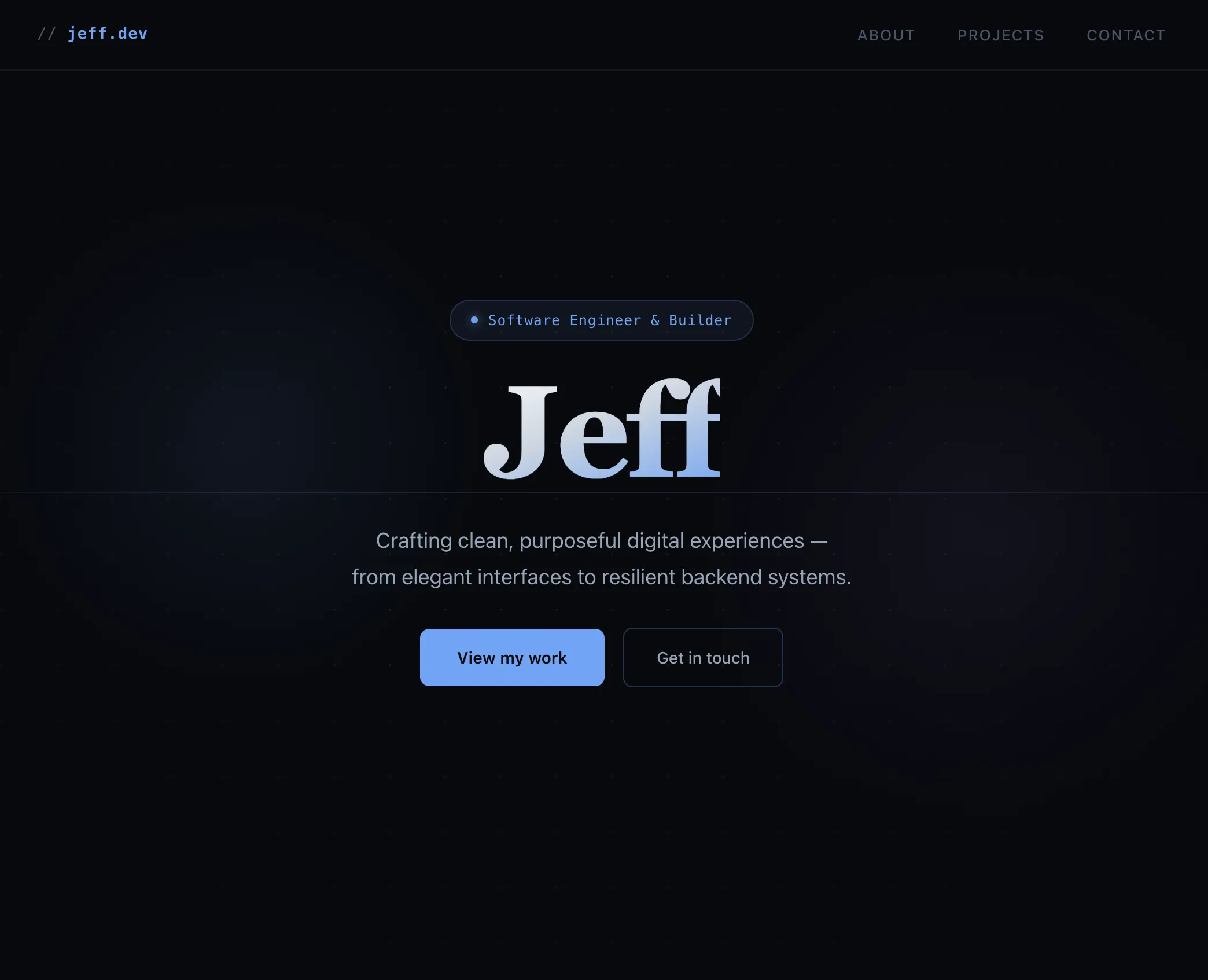
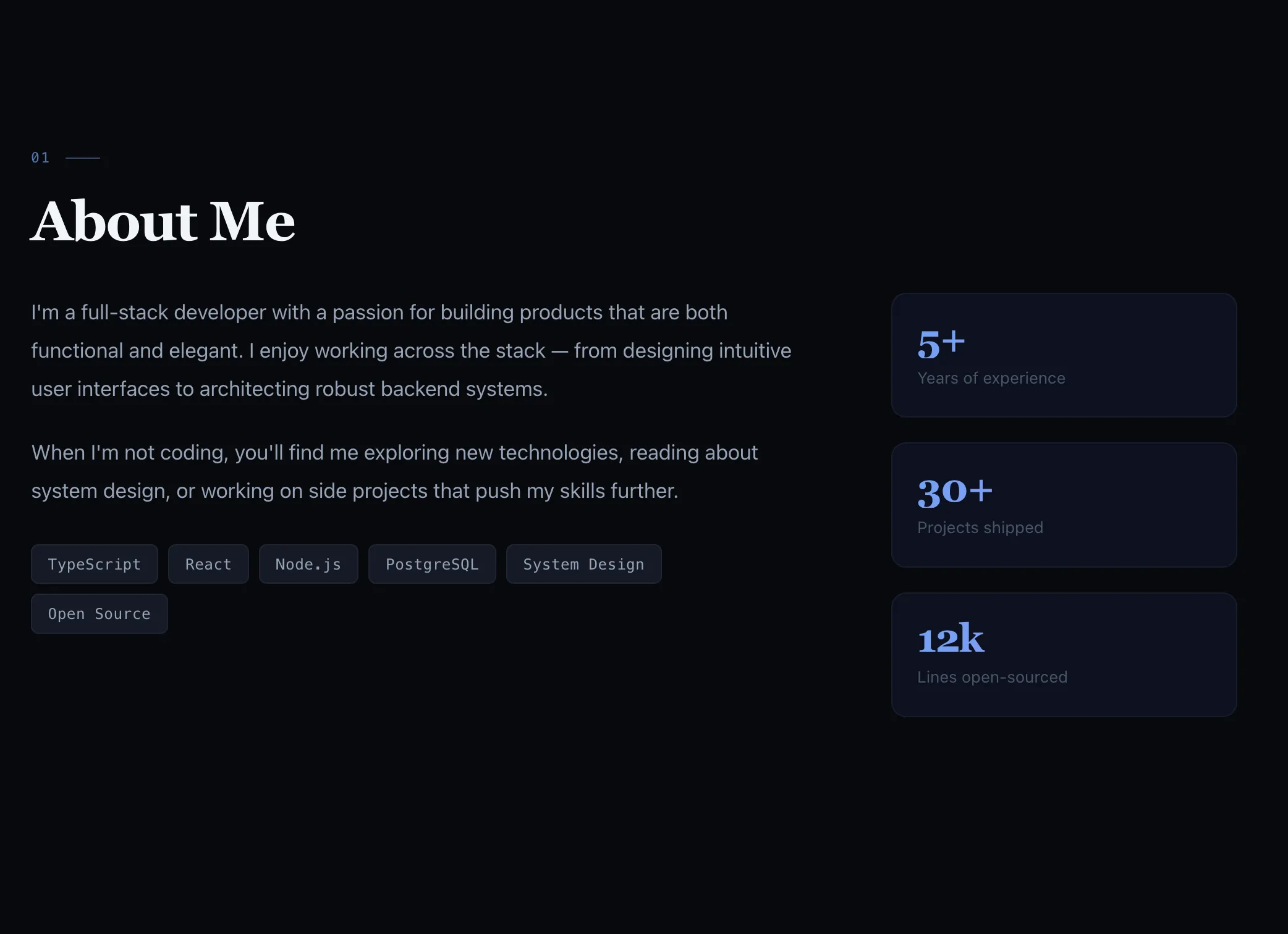
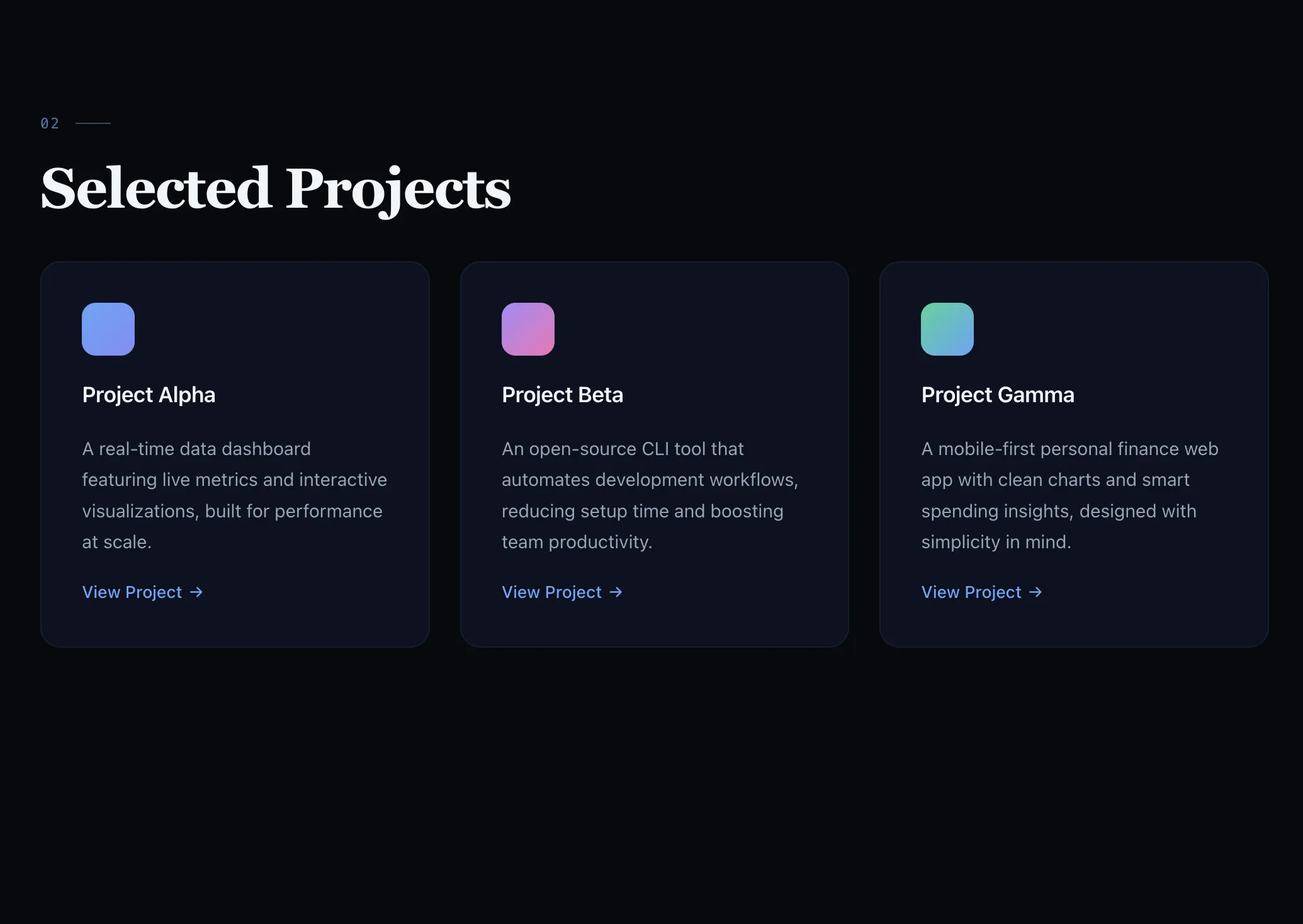
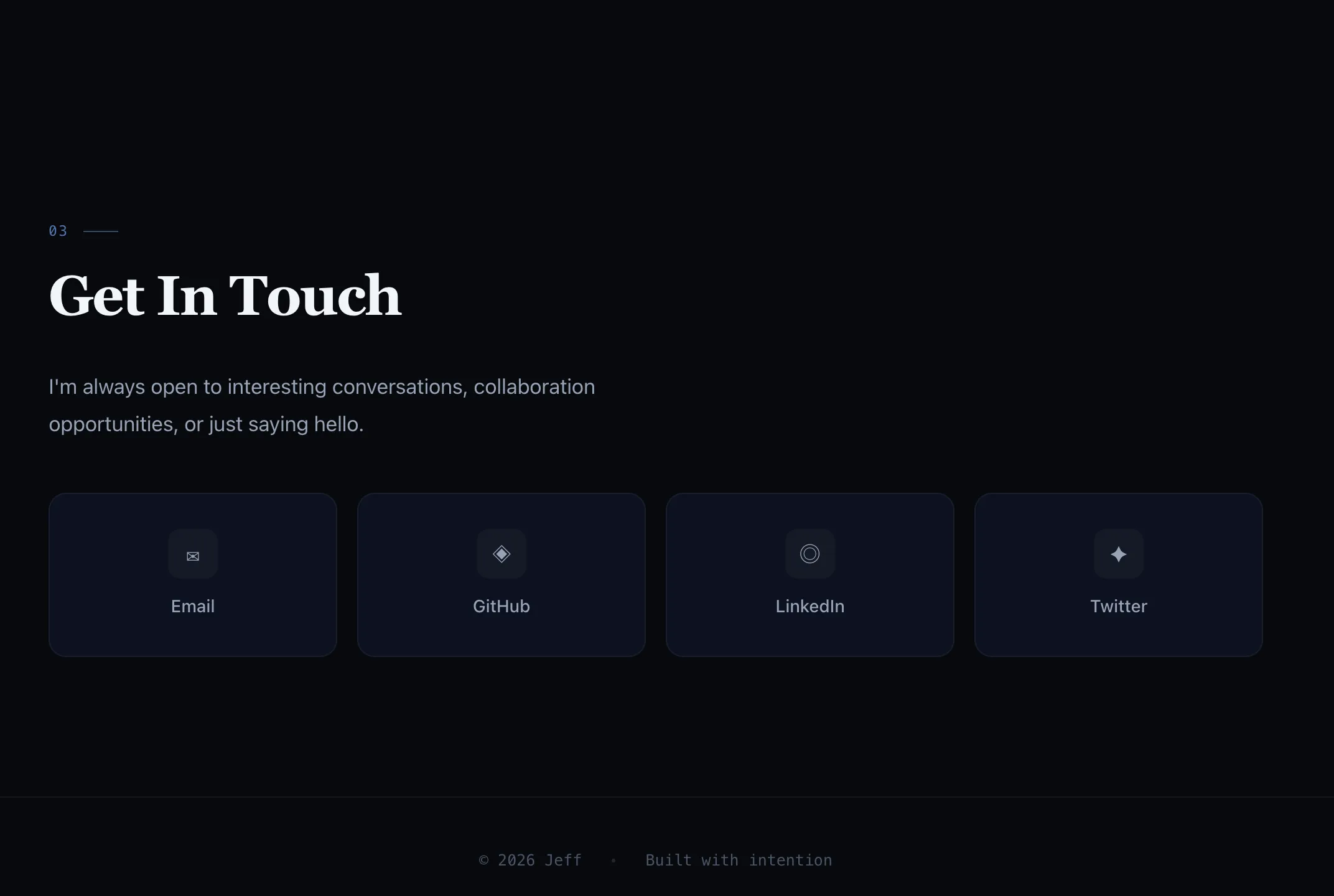
Much better, right? 😎
Retrospective: What Actually Just Happened?
Let’s zoom out. In the past 30–60 minutes, your AI company:
- Received a strategic objective (Company Goal)
- Autonomously decomposed it into actionable tasks (CEO → Project → Issues)
- Waited for your approval before taking action (Governance gate)
- Self-scheduled execution via heartbeat (no manual “start working” commands needed)
- Delivered a tangible artifact (an HTML file you can open)
- Operated within budget (warned you before overspending)
- Iterated based on feedback (new Issue → new execution cycle)
Every concept from the first four days surfaced naturally in this exercise:
| Day | Concept | Where It Appeared |
|---|---|---|
| Day 1 | AI Company vs AI Assistant | You were managing a team, not typing in a chat window |
| Day 2 | Org Chart | CEO delegated tasks to the Engineer through the reporting line |
| Day 3 | Goal Alignment | Engineer knew the page was for your personal brand, not a generic template |
| Day 4 | Budget Control | The 80% warning put the brakes on before you spiraled into infinite iterations |
| Day 5 | End-to-end exercise tying Days 1–4 together | Agents woke up on their own, checked the task queue, and worked — without you nudging them |
Cost Report: How Much Did This Actually Cost?
Here’s a rough breakdown from a real run:
| Agent | Activity | Approximate Cost |
|---|---|---|
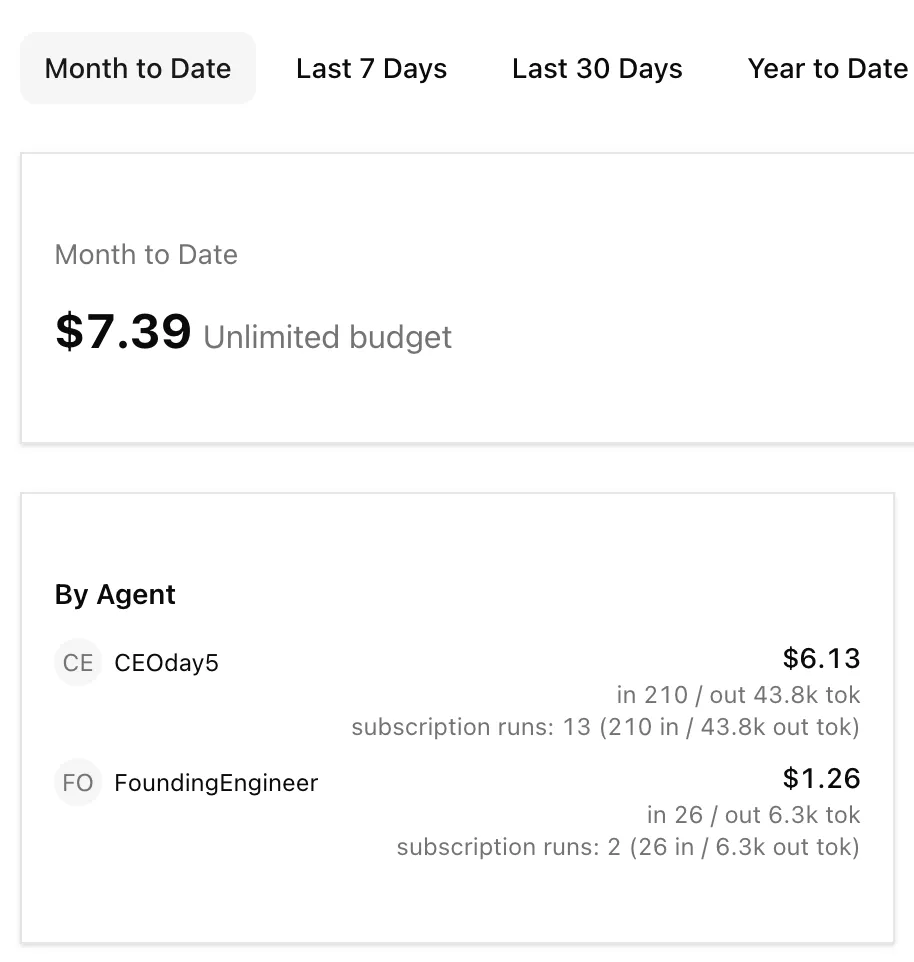
| CEO | Goal decomposition + 3 heartbeat cycles | ~$6.13 |
| Engineer | HTML generation + 1 iteration | ~$1.26 |
| Total | ~$7.39 |
Actual costs depend on model choice, goal complexity, and number of iterations. Swapping the Engineer to a cheaper model (e.g., Sonnet instead of Opus) can save 50–70%.
Check your actual costs: click Costs in the left sidebar for a visual breakdown by Agent and by Project.
Today’s Tasks ✅
- Set a Company Goal: Write a specific goal for the landing page project (remember, the more specific the better!)
- Speed up heartbeats: Change
intervalSecto120for both the CEO and Engineer - Approve the CEO’s strategic plan, then watch the execution unfold automatically
- Open the delivered HTML file: Admire your AI company’s first product in the browser
- Create an iteration Issue: Pick something you’re not happy with and let the company improve it
- Check the Costs dashboard: How much did your AI company charge you this time?
Emergency Handbook: Common Issues at a Glance
| Symptom | Cause | Fix |
|---|---|---|
| Nothing happens after approval | intervalSec set too high | Click Run Heartbeat to trigger manually |
Agent stuck in in_progress | Hit maxTurnsPerRun limit | Increase to 500 |
| File written to wrong location | Goal didn’t specify absolute path | Add the full output path to the goal |
| Page is ugly / content is generic | Goal too vague | Add design details (colors, theme, section content) |
| Budget warning after 2 iterations | Budget set too low | Increase budgetMonthlyCents or accept the current result |
| Two agents editing the same file | Missing atomic execution guard | Ensure maxConcurrentRuns: 1 and clear Issue assignment |
If you want to learn more about the secrets of Agent heartbeats, check out this article.
Coming Up: Day 6 — Governance
Your company just delivered its first project. But if something goes wrong, who’s accountable? How do you trace which Agent made which decision? Tomorrow we put on the auditor’s hat.
Approval gates, audit logs, and the nuclear options: pause, override, and terminate.
Boss, see you in the boardroom tomorrow.
Your AI company just shipped its first product. Not by chatting — by setting a goal, approving a strategy, and letting the machine run on its own.
Welcome to being the boss.